ClockWise HRGuideAdding someone to a closed period
Adding someone to a closed period
Someone was left out of a period that is already closed — a new starter with no schedule, perhaps. Add them to it with the pay worked out from their leave days and the hours you enter, and set the net yourself if it needs correcting.
This is for a closed period only. In an open period, everyone with days in the branch is already there; somebody missing has no calculated days — give them a schedule, then recalculate (see Giving someone a schedule and Recalculating and locking a period).
The person must be filed in the period’s branch and have nothing in the period. Your account needs permission to add people to a closed salary.
Have their hours to hand if they are paid by the hour: a signed timesheet, for example.
1Choose the person
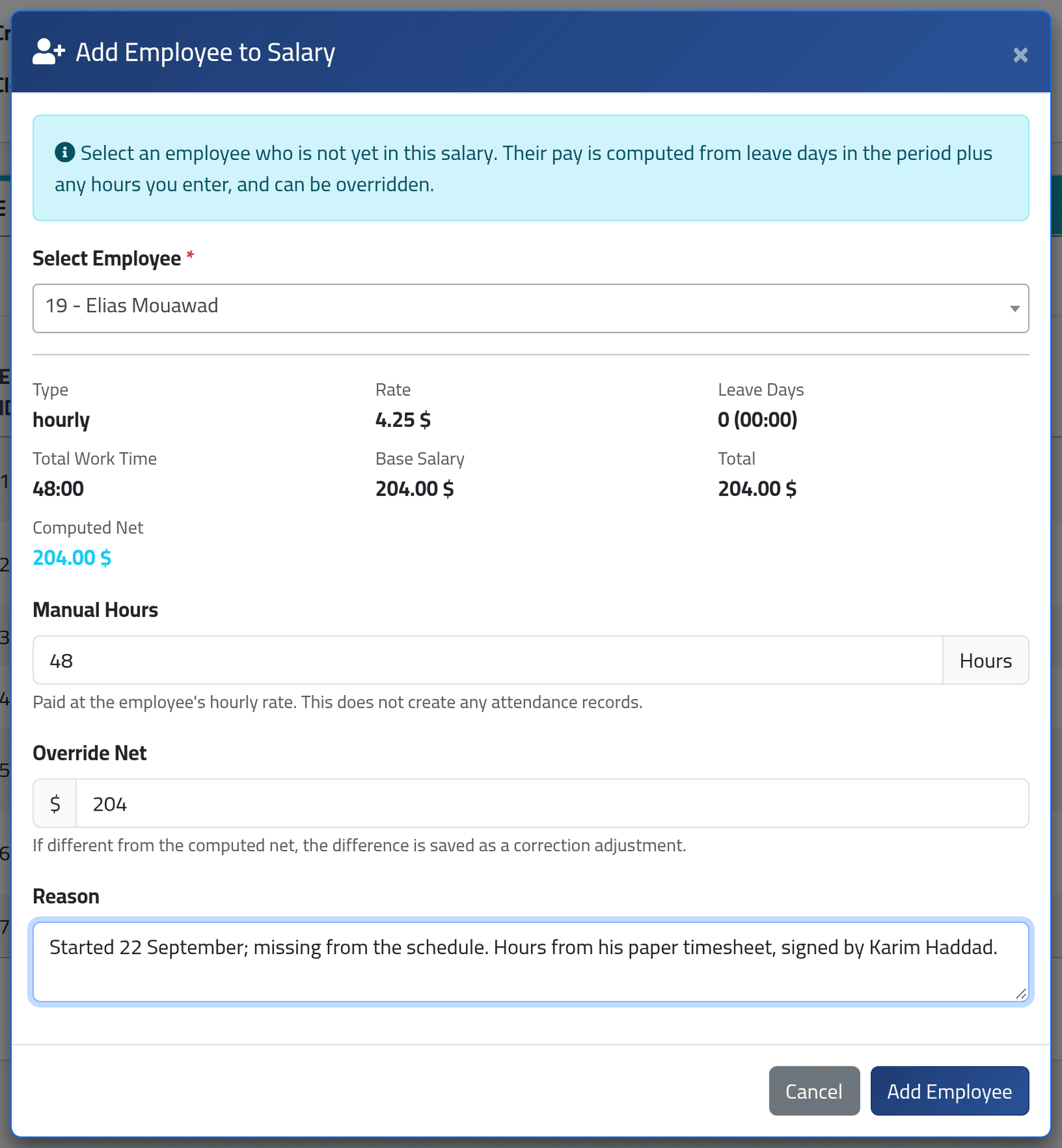
Open the closed period, click Actions, then Add Employee, and choose them in Select Employee.
ClockWise works out their pay from what it has:
- their leave days inside the period, counted as paid days;
- for someone paid by the hour, the hours you type in Manual Hours, at their hourly rate.
For a fixed salary, the result is the whole monthly rate, however few days the person was there. For someone who started late in the period, type the right amount in Override Net.
In the picture, Elias Mouawad started on 22 September with no schedule. He is paid by the hour; 48 hours from his timesheet at $4.25 come to $204.00.
2Check the net, give a reason
Override Net is filled with what ClockWise worked out. Change it if it is wrong: the difference is saved as a correction on the period.
Write a Reason — where the hours came from, who signed. Click Add Employee.
What happens next
The person appears in the period, Pending, and can be paid like everyone else — see Paying and holding salaries. An override shows as a Post-Close correction on the period’s Adjustments tab.
They are not in any payment batch generated before. Pay them directly, or generate a new batch.
Someone with no leave days gets one placeholder day in their attendance, on the period’s first day, marked as an error and as corrected. It is what ties them to the period; leave it alone.
There is no way to take someone out of a period again.
If it goes wrong
| What you see | What it means |
|---|---|
| The person is not in Select Employee | They are in another branch, or they already have something in this period. |
| Manual Hours does not appear | The person is not paid by the hour. Use Override Net instead. |
| Add Employee is not in Actions | The period is open, or your account may not add people to a closed salary. |
| The dashboard counts one more attendance error | The placeholder day. It changes no one’s pay. |