ClockWise HRGuideAdjusting one period's pay
Adjusting one period's pay
A bonus, a deduction or a correction added straight to one salary period, whatever today's date. This is the way to adjust last month while it is still open. One caution: Hours are multiplied by the person's rate, whatever that rate is.
Your account must be allowed to add adjustments to a salary, and allowed each type separately — appraisals, deductions and corrections are three permissions. A type you may not use is not offered. Adding to a period that is already closed is a further permission.
1Open the period's adjustments
Open the period (see Reading a salary period) and click the Adjustments tab. The number beside it counts what is there.
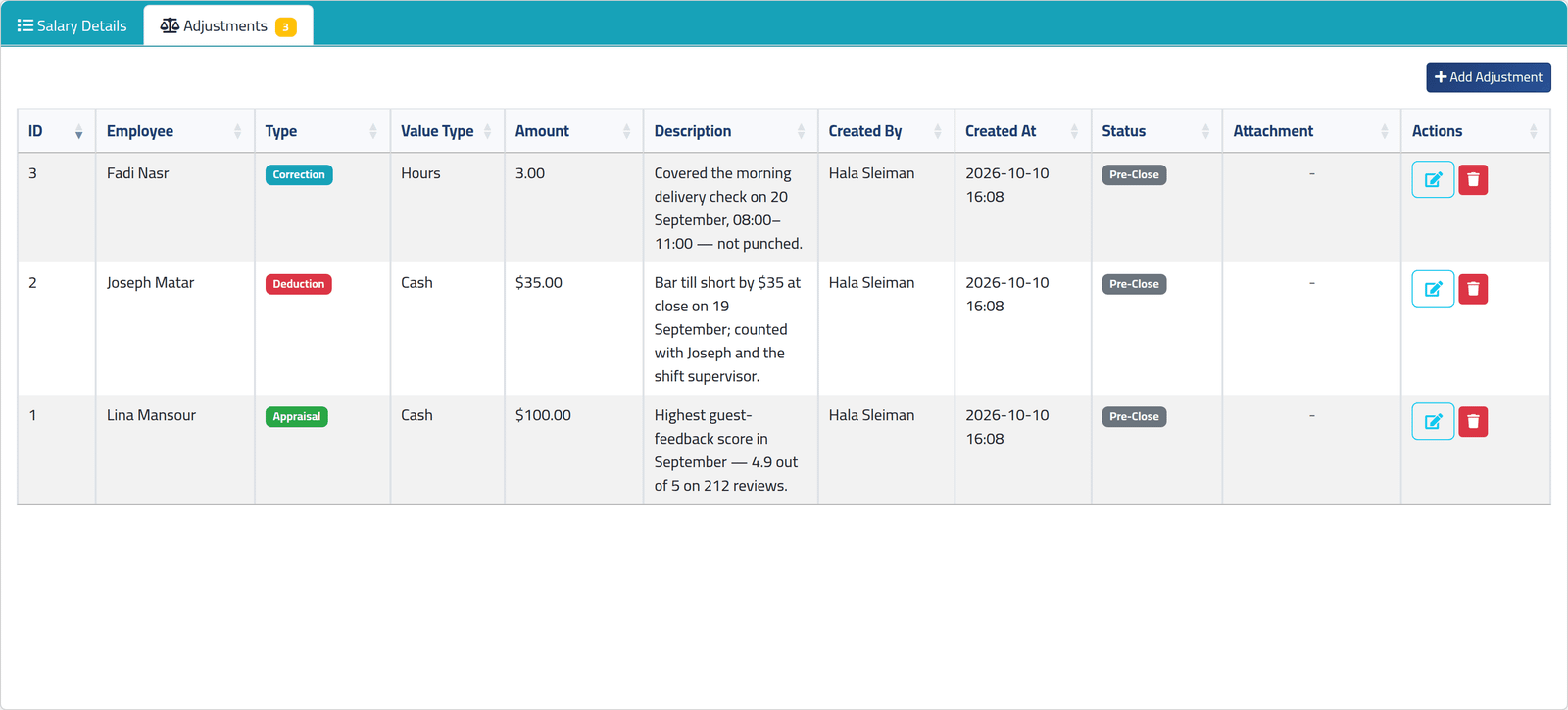
Each row shows the person, the Type, Cash or Hours, the amount, the reason, who added it and when, and its Status:
- Pre-Close — added while the period was open;
- Post-Close — added after it closed;
- Dismissed — the person’s salary for the period was dismissed, and their adjustments with it.
2Add one
Click Add Adjustment.
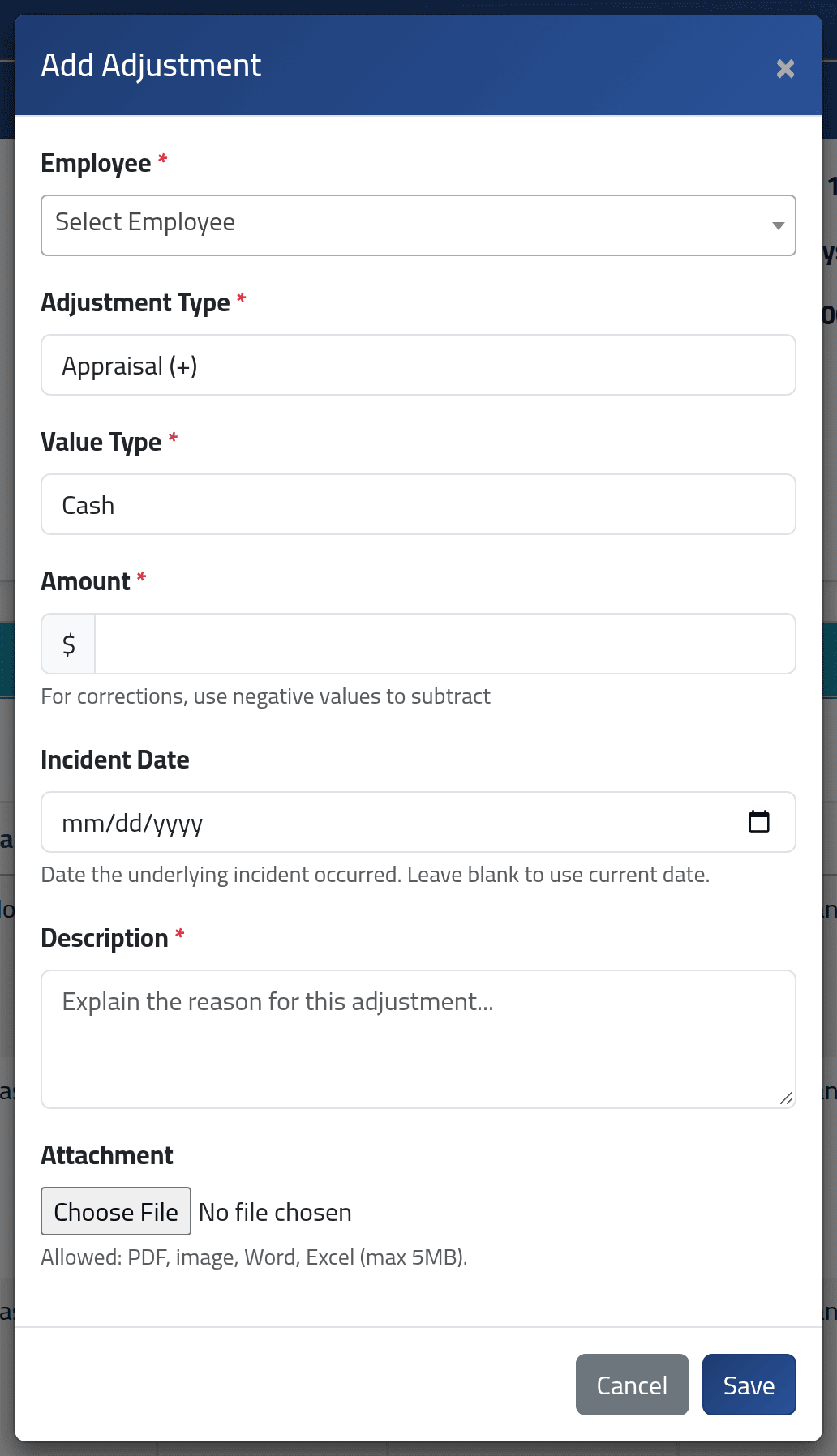
- Employee — only people in this period are offered.
- Adjustment Type:
- Appraisal (+) adds to the salary — a bonus.
- Deduction (-) takes away.
- Correction (+/-) puts a mistake right in either direction. Type a minus amount to take away.
- Value Type — Cash, an amount of money, or Hours.
- Amount.
- Incident Date — when it happened, if it matters. Optional.
- Description — the reason. Required; write it for the person who will ask in six months.
- Attachment — a receipt or a signed note. Your company may require one.
Click Save.
Hours are multiplied by the person’s rate — whatever kind of rate it is. For someone paid by the hour, three hours is three hours’ pay. For someone paid by the day, each hour is worth a whole day’s rate. For a fixed salary, each hour is worth the whole month’s salary. This dialog does not stop you. Use Hours only for hourly employees; for everyone else, work the amount out and enter it as Cash.
In the picture, Fadi Nasr — paid by the hour — has a three-hour correction for a delivery check he did not punch.
3Change or remove one
While the period is open, the pencil on a row edits it and the bin deletes it, after you confirm. Once the period is closed, an adjustment can no longer be edited from here, only deleted.
What happens next
An adjustment added here belongs to this period, whatever today’s date. While the period is open, the person’s Net Total includes it at once; open their breakdown to see it listed.
When the period closes, its adjustments close with it.
After closing, Add Adjustment is still there for accounts allowed to use it. The dialog is marked Post-Close and warns you. Saving works out that person’s closed salary again, and so does deleting one.
A post-close adjustment changes a salary that has been closed — and ClockWise does not check whether that salary has already been paid. Agree it with whoever makes the payments before you save.
If it goes wrong
| What you see | What it means |
|---|---|
| A type is missing from Adjustment Type | Your account may not use that type. |
| There is no Add Adjustment button | Your account may not add adjustments, or holds none of the three type permissions. |
| An amount in hours became far too large | It was entered in Hours for someone not paid by the hour. Delete it and add it again in Cash. |
| A page saying the action is not authorised when you save on a closed period | Adding after closing needs its own permission. |
| The person is not in Employee | They are not in this period. For a date still to come, use Adjustments for the coming salary. |