ClockWise HRGuidePayment batches
Payment batches
A batch is the list you pay a closed period from: one line per person, with the account to pay into. Generate it before marking anyone paid on the salary page, because a batch takes in everybody — including people already paid.
- The period must be closed.
- Each person’s default payment account is what the batch uses — see Payment accounts. Somebody without one gets a line with no method.
- Hold anyone who must not be paid first (see Paying and holding salaries). A batch leaves out held salaries, but only those held when it is generated.
Generating, cancelling and seeing batches are separate permissions.
1Open the batches
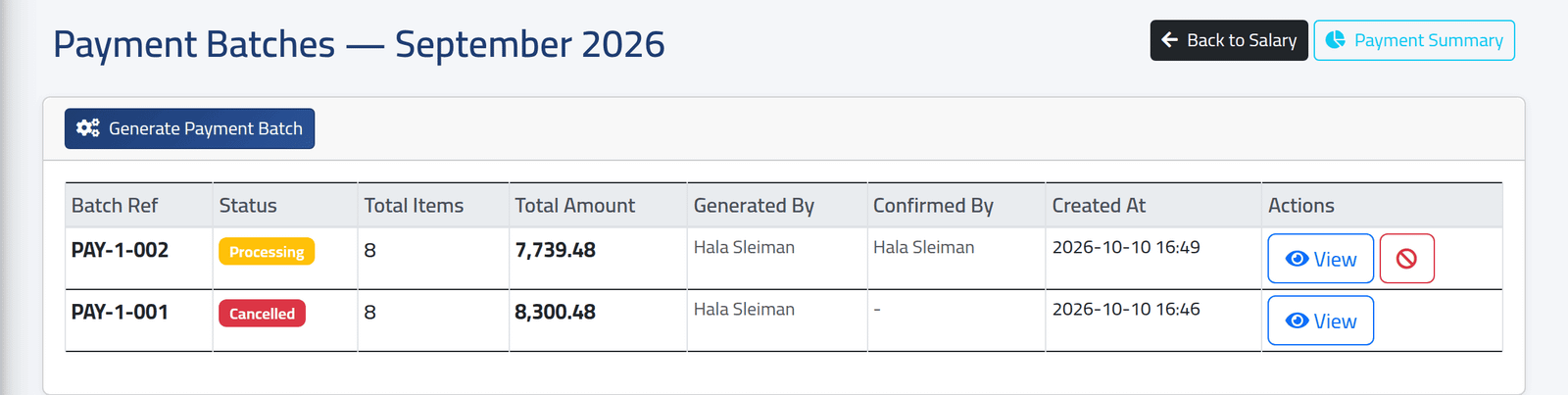
On the closed period, click Actions, then Payment Batches.
Each batch has a reference (PAY-…), a status, its number of lines and total, and who generated and confirmed it. In the picture, PAY-1-001 was cancelled because Elias Mouawad had been left out of September, and PAY-1-002 is being paid.
2Generate one
Click Generate Payment Batch and confirm. ClockWise adds one line for everyone in the period whose salary is not held and is above zero, with their default account as it is now.
A batch takes in people already marked paid, as lines still to pay. If you have paid anyone from the salary page, they are in the batch again. Generate the batch first, and pay from it.
3Confirm it
When the lines are right, click the tick on the batch, or Confirm Batch inside it. The status goes from Draft to Confirmed. Then pay it — see Paying a batch.
The status moves on by itself: Processing once the first line is paid, Completed when every line is.
4Cancel one
Click the red circle on the batch, give a Cancel Reason, and click Cancel Batch. Any batch that is not completed can be cancelled.
Cancelling does not undo anything already paid from it.
5See what is left to pay
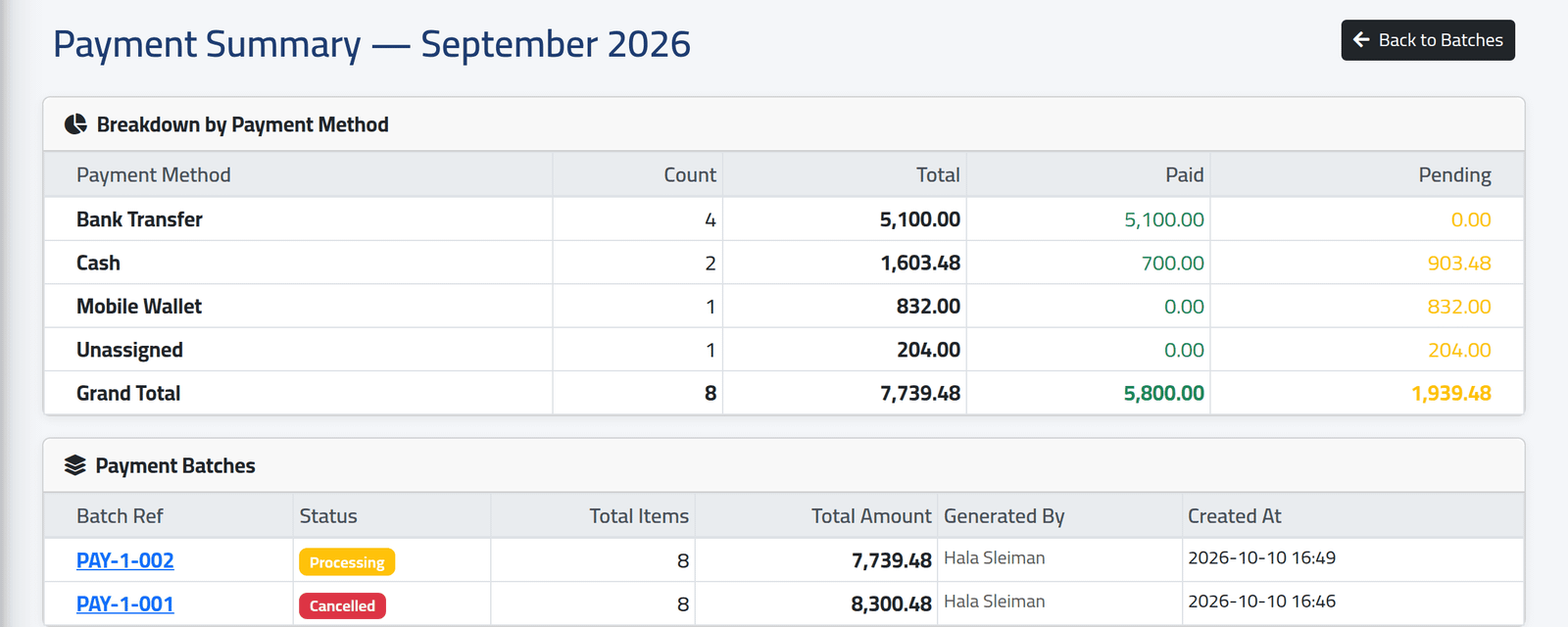
Payment Summary, at the top of the batches, adds up every batch of the period except cancelled ones: per payment method, how many lines, the total, how much is paid and how much is pending.
What happens next
A person’s account details are copied into the batch when it is generated. If an account changes afterwards, cancel the batch and generate a new one.
Nothing stops two live batches for the same period. Cancel the old batch before generating its replacement, or the same people are listed to be paid twice.
If it goes wrong
| What you see | What it means |
|---|---|
| Salary must be closed before generating payments. | Close the period first. |
| No salary details with positive net salary found. | Everybody is held or has nothing to be paid. |
| Completed or already cancelled batches cannot be cancelled. | The batch is finished. |
| No Payment Batches in Actions | The period is open, or your account may not see batches. |
| Unassigned in the summary | Lines with no payment method — someone without a default account. |