ClockWise HRGuideSharing out a tips box
Sharing out a tips box
A tips run shares one sum of tips between the people of a closed salary period, by their tip shares and the hours they worked. Tips are paid separately; they never change a salary. Set people's shares first — everyone starts at zero.
- The salary period must be closed — see Closing a salary period. Each period can have one tips run.
- Everyone needs tip shares. Each person’s Tip Shares and Tip Type are set on their file, in Setting an employee’s pay. Everyone starts at 0 shares, which earns nothing. Typically a waiter has 1, a junior 0.75, a supervisor 1.5, the office 0.
- Your account must be allowed to create tips runs; seeing the amounts is a permission of its own.
How a share is counted, per person:
| Tip Type | Hours counted |
|---|---|
| VF | the hours worked, up to Normal share hours |
| VARIABLE | the hours worked, up to Maximum calculated hours — the only type that can earn more than a full share |
| FIX | a full share once the hours reach FIX minimum hours; below that, the hours worked |
Anyone under Minimum calculated hours gets nothing. The pot is then divided in proportion to shares × hours counted.
1Fill in the run
In the menu on the left, under Tips, click Tips Runs, then + New Run.
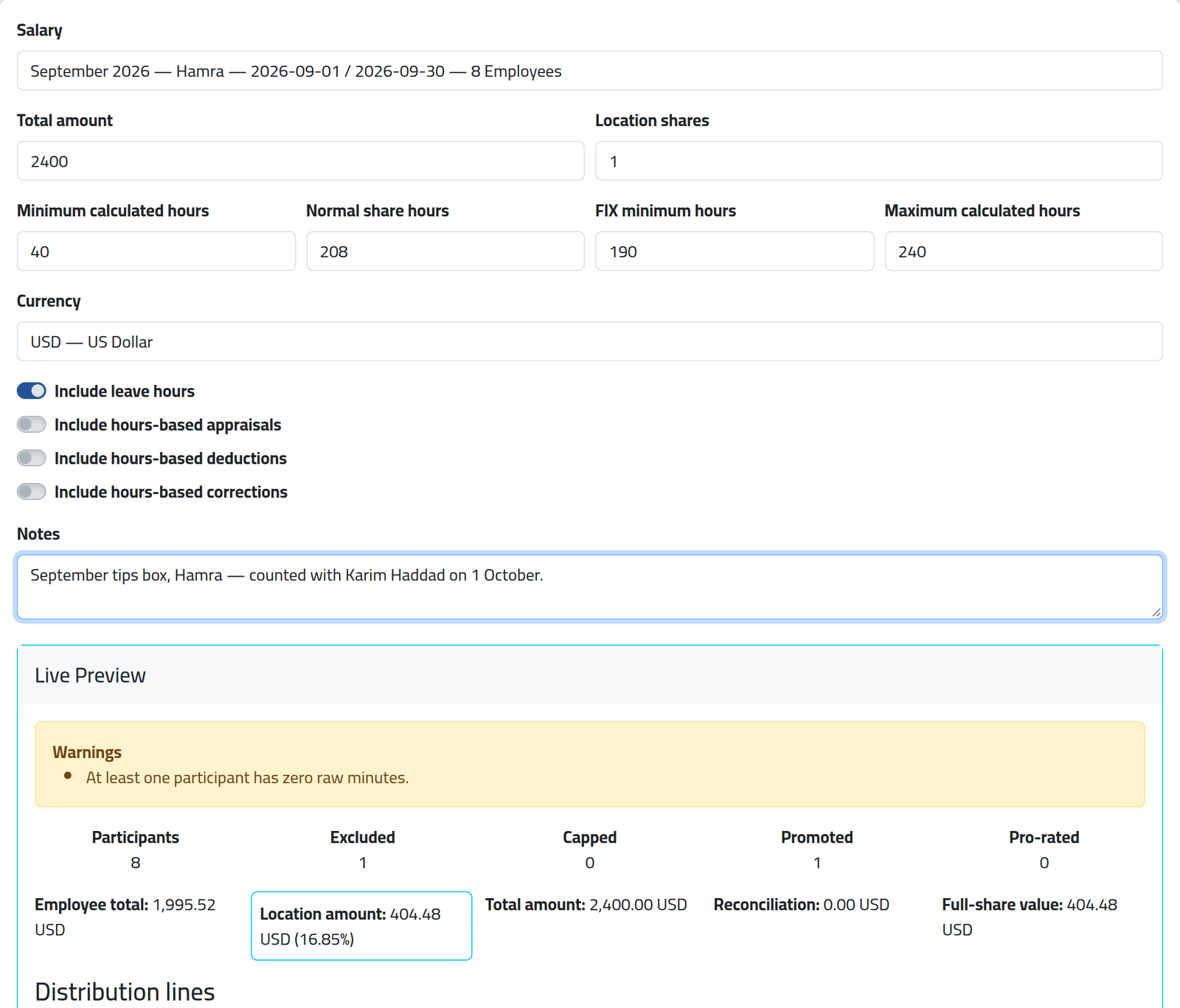
- Salary — the closed period, with how many people are in it.
- Total amount — the money in the tips box.
- Location shares — the house’s own share, counted like a person working Normal share hours: 1 means the house takes one full share. 0 means it takes nothing.
- The four hour limits — the defaults come from your company’s settings.
- Include leave hours — whether paid leave counts as hours worked. The three switches below add or remove hours-based adjustments only; cash adjustments never count.
- Notes — where the money came from.
2Read the preview
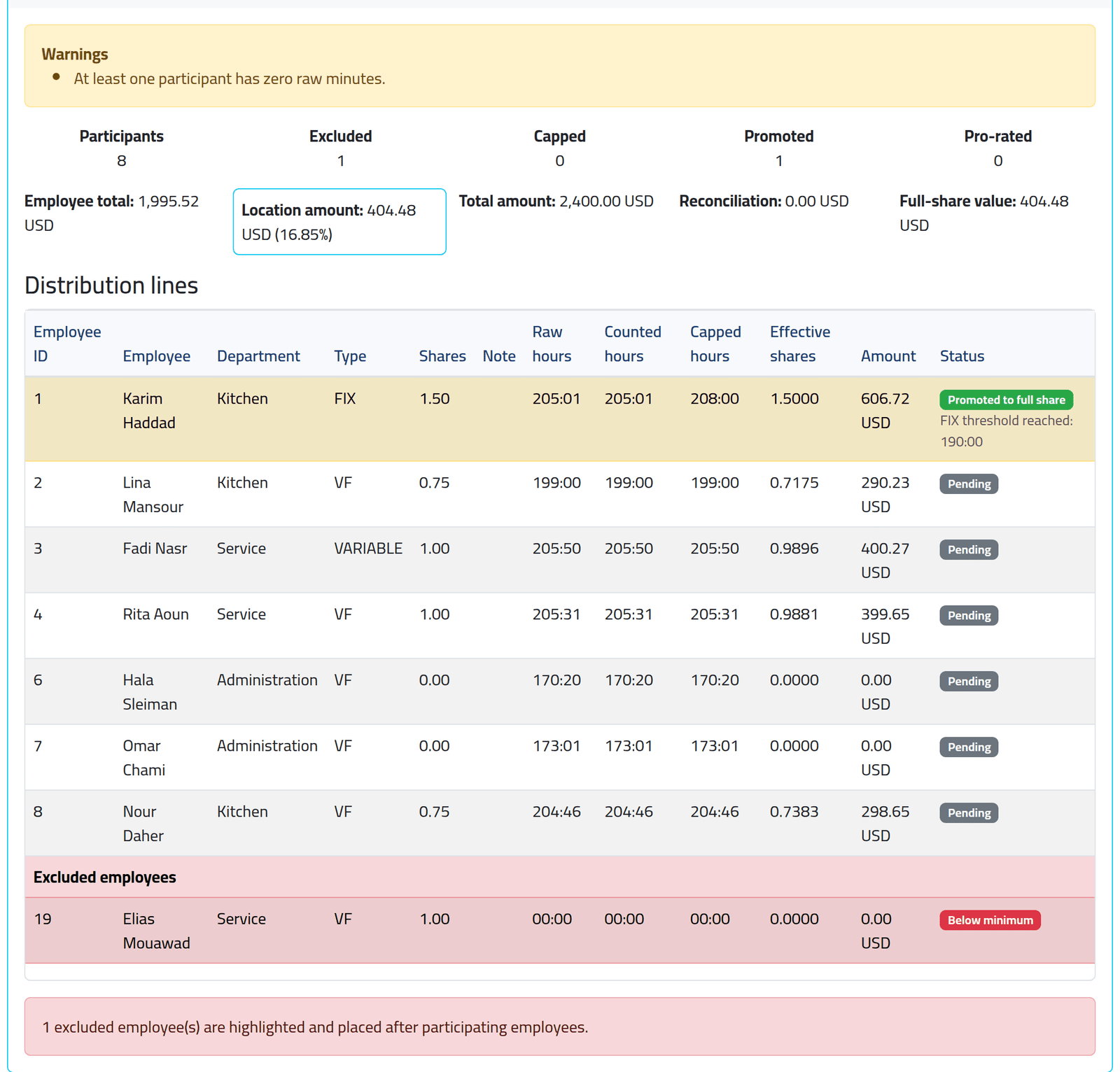
Live Preview recalculates as you type: the house’s amount, then one line per person — hours raw, counted and after the limits, shares, effective shares and amount. Nothing is saved yet.
In the picture, Hamra’s $2,400 for September. Karim Haddad, a FIX supervisor with 1.5 shares, worked 205 hours — above 190 — and counts as a full 208. The office staff have 0 shares and get nothing.
Tips follow the attendance, not the salary. Two people in the picture show what that means:
- Elias Mouawad is Below minimum with 00:00 hours: he was added to the closed period with hours from a paper timesheet (see Adding someone to a closed period), and those hours are not attendance. Raising his shares does not help — shares times no hours is nothing — and a run has no way to give one person a fixed sum. Settle his tips outside the run.
- Joseph Matar is not listed at all: his September salary is held (see Paying and holding salaries), and a held salary takes its tips with it.
Click Create.
What happens next
The run is saved as a Draft: nothing is paid and everything can still change — see Changing a draft run. Then close it (see Closing and reopening a tips run) and pay it (see Paying out tips).
If it goes wrong
| What you see | What it means |
|---|---|
| There is no closed salary without an existing tips run. | Every closed period already has a run, or none is closed yet. |
| Everyone gets nothing | Nobody has tip shares — set them on the employees’ files. |
| The house takes too much | Location shares is in shares, not percent. The run shows the house’s percentage beside it. |
| A refusal about the hour limits | The limits must rise: minimum < normal, FIX minimum ≤ normal ≤ maximum. |