ClockWise HRGuideStarting an inspection yourself
Starting an inspection yourself
An inspection nobody assigned — a spot check — starts from a form and a branch. Starting the same form at the same branch again opens the draft you already have rather than a second one.
Your account must be allowed to start inspections on its own; some inspectors may only do what they are assigned. The form must be published by the office.
1Choose the form and the branch
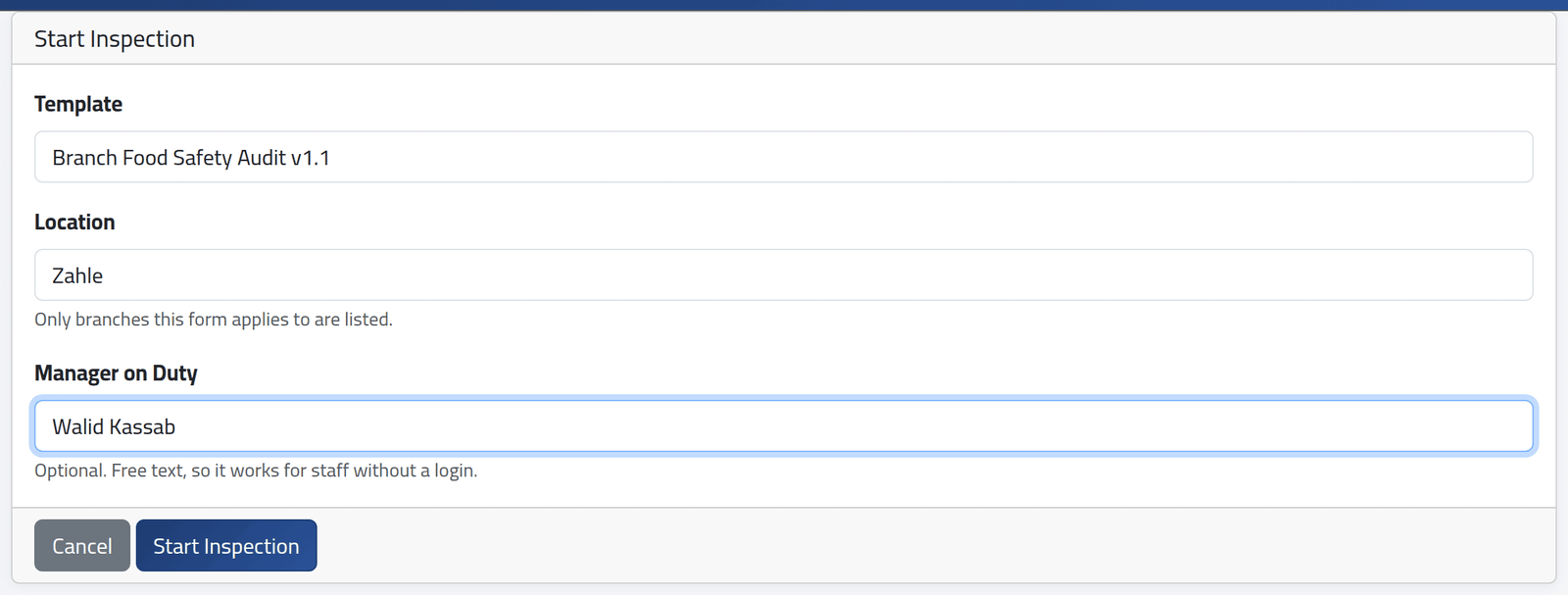
On My Inspections, click Start Inspection.
- Template — the form, with its version.
- Location — the branch. Only branches this form applies to are listed.
- Manager on Duty — the person in charge during the visit, typed as a name. It can also be filled in when submitting.
Click Start Inspection.
What happens next
The form opens, and the inspection is a draft under In Progress on My Inspections — see Filling in an inspection.
One draft per form and branch. If you already have one, starting again opens it, with the message Resumed the inspection already in progress for this branch. Discard the old one first to begin afresh.
If it goes wrong
| What you see | What it means |
|---|---|
| That template does not apply to the selected branch. | The form is not used at that branch. |
| No form to choose | No form is published yet. Ask the office. |
| No Start Inspection | Your account may do assigned inspections only. |