ClockWise HRGuideLoans, advances and early salary
Loans, advances and early salary
Three reports follow money paid to employees ahead of their salary: loans and what remains on them, advances, and early salary payments and the period they are recovered from.
On Reports, open Salary Reports. Choose a branch under Filter on each report.
1Loans
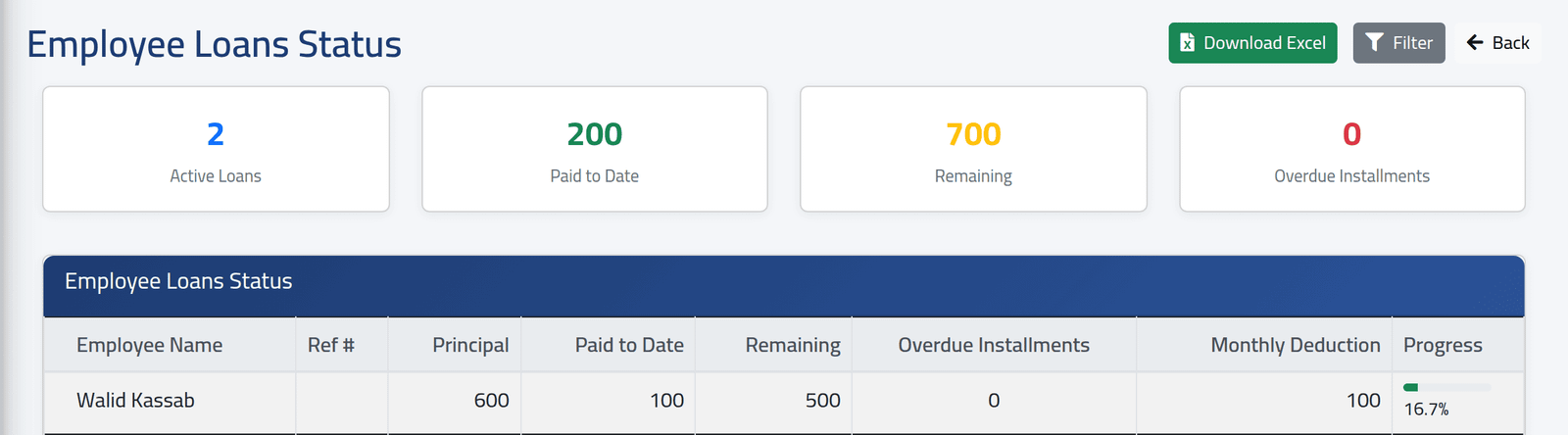
Employee Loans Status: every active loan with its principal, how much has been repaid, what remains, how many instalments are overdue, the monthly deduction and a progress bar; and the totals at the top.
Repayments count here when they are taken from a salary or paid in — see Lending to an employee and Repayments outside the salary. Walid Kassab, in the picture, has repaid $100 of his $600.
2Early salary
Early Salary Reconciliation: every early payment with its period, gross and net, its status, and the salary period it was recovered from once that period is generated. Nour Daher’s October payment, here, is not linked to a period yet. See Paying someone early.

3Advances
Advance Payments Report lists advances with their amount, whether they were applied to a salary and which. It is empty in the demo: advances are not created from any screen a user can reach.
What happens next
Download Excel exports each report.
Remaining includes fees; principal does not, so for a loan with a fee the two do not add up. Totals add currencies together.
If it goes wrong
| What you see | What it means |
|---|---|
| A loan is missing | It is not active or approved, or the employee is in a branch you may not see. |
| An early payment shows no linked salary | The period it is recovered from has not been generated yet. |