ClockWise HRGuideRecalculating a branch
Recalculating a branch
Work every day in a range out again for everybody in a branch, after a schedule or shift has changed. Corrected days are kept — unless you tick the box that deletes them.
Recalculate when the rules behind past days have changed — a shift’s times, a schedule — and those days should follow. ClockWise already recalculates the last couple of days every two hours; this is for anything older.
Your account must be allowed to recalculate a location.
1Open the branch's actions
In the menu on the left, under Company, click Locations. On the branch’s row, open Actions and choose Recalculate Attendance.
2Choose the days
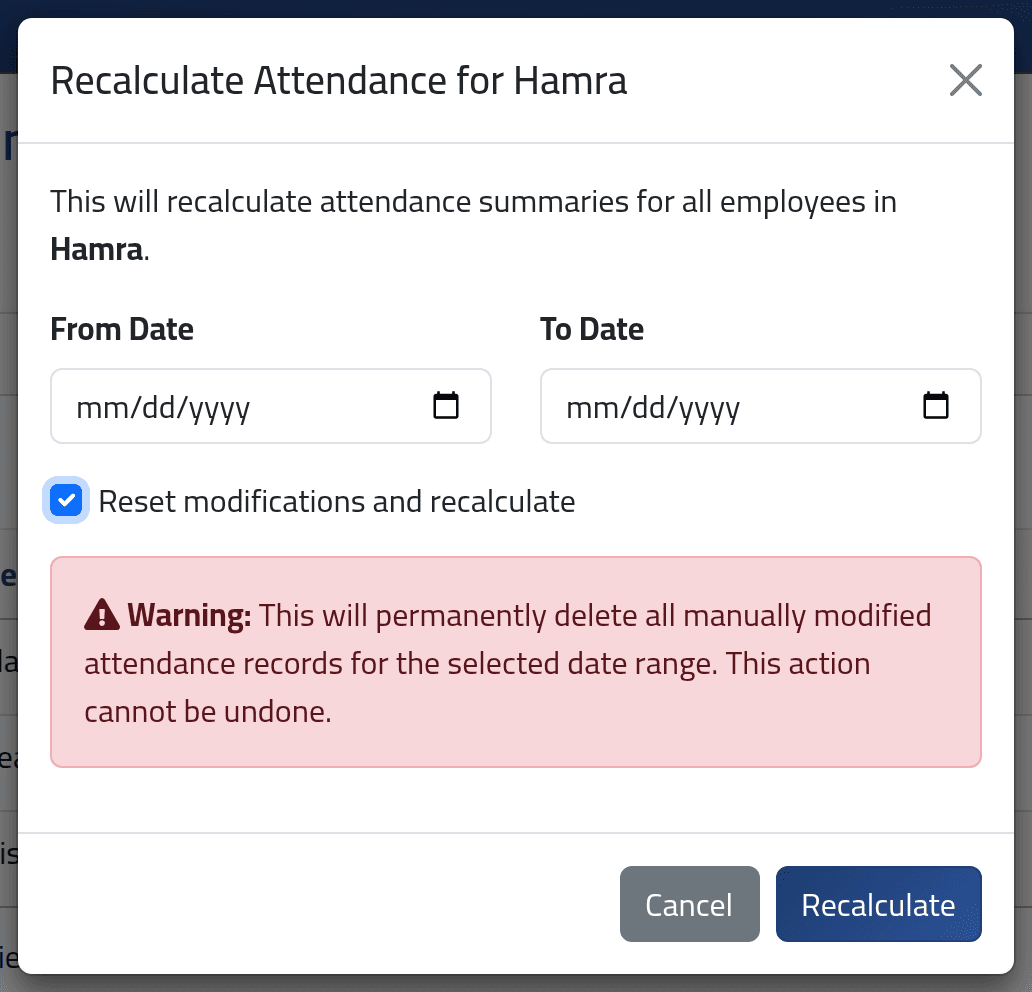
Give a From Date and a To Date.
Leave Reset modifications and recalculate unticked unless you mean it.
Reset modifications and recalculate deletes every hand correction in the range for the whole branch — added punches, changed shifts, approved requests — and works those days out again from the machines’ punches alone. It cannot be undone. Leave days are rebuilt from the leave records, so leave survives; everything else that was corrected must be corrected again.
3Recalculate
Click Recalculate.
What happens next
The work is queued and done in the background; a message says so. While it runs, the dashboard may show a Background Jobs Status card.
- Days corrected by hand are kept — they are never recalculated automatically.
- Days with a correction waiting for approval are kept as they are.
- Days inside a closed salary period are left unchanged; the message says how many.
To recalculate every branch at once, an administrator can use Actions › Recalculate above the employee list, with the same rules.
If it goes wrong
| What you see | What it means |
|---|---|
| A corrected day did not change | Corrected days are kept. Reset that one day from Correcting a day if it should be recalculated. |
| Nothing seems to have changed | The work runs in the background — wait a minute and generate the days again. |
| The message says some days were left unchanged | Those days are in a closed salary period. |